


Tidy X
4.6804.00 Reviews
App Specs
- Version
- 1.7.2
- Updated On
- License
- Free
- Downloads
- 1,000,000+
- Developer
- Heartsnet
- Categories
- Board
- Platform
- Android
Screenshots
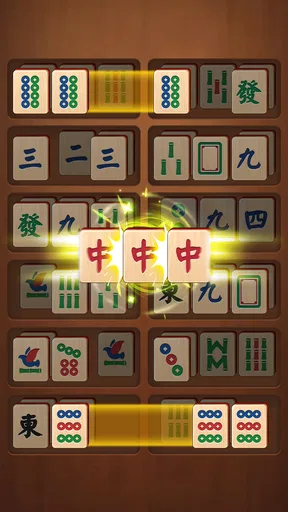
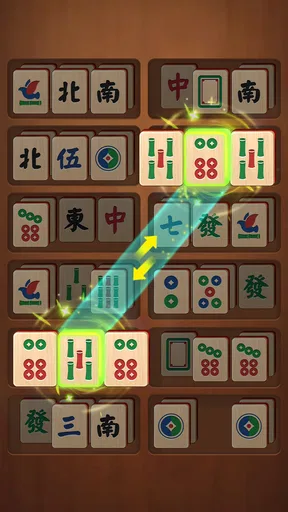
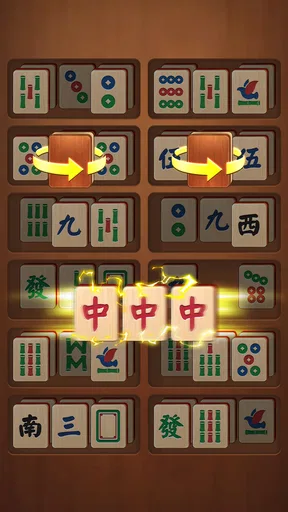
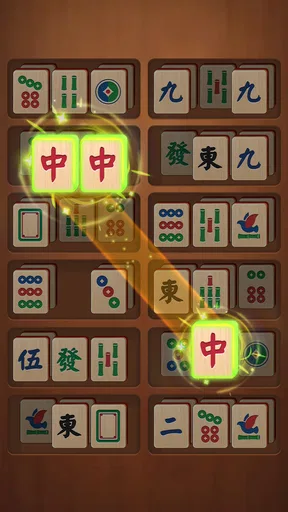
 Analysis by AppCompare
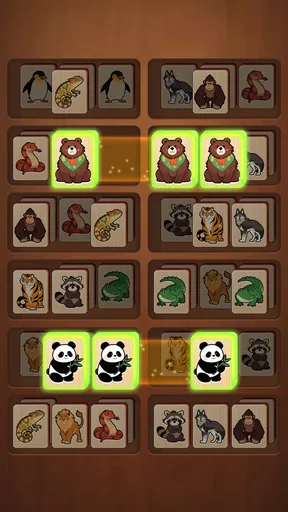
I approach Tidy X as a board game for the moments when I want a small, orderly puzzle rather than a sprawling game that demands my attention. Its focus is tile matching, sorting, and arranging things neatly, so the appeal is easy to understand: make a little progress, enjoy the satisfying sense of order, then put the phone down. If you are trying it for the first time, that modest promise is the right place to begin.
What kind of puzzle to expect
This is a casual board game from Heartsnet, and its central pleasure is visual and deliberate. Instead of asking me to learn a long ruleset or keep track of a complicated story, it invites me to look at a board, notice how its pieces relate, and work toward a tidier arrangement. That makes it a natural fit for a short break, although it is still a puzzle: a relaxed mood does not mean every move will be obvious.
The difference between this and a conventional matching game matters. Many familiar match games emphasize making combinations quickly, often with pressure from a timer or a changing board. Tidy X leans toward sorting and neatness, so I would choose it when I want to think through what belongs where rather than chase a fast score. If competitive play, elaborate progression, or constant new mechanics are what keep you engaged, a more action-oriented puzzle may suit you better.
Starting calmly and finding a first success
My advice to a new player is to treat the opening session as a chance to understand the board, not as a test of speed. Take a moment to scan what is already grouped and what looks out of place, then make one move that clearly improves the arrangement. That first visible improvement is more useful than tapping around at random: it gives you a simple way to judge what the game is asking you to do and whether its pace feels comfortable.
A practical routine is to look for the easiest match or sorting decision first, then pause and check how that move changes the remaining choices. In tidy-up puzzles, a move can feel satisfying immediately but leave awkward pieces behind, so I try to balance the quick win with a glance at what it opens up. This is a small habit, but it makes the play feel intentional rather than like a sequence of guesses.
You do not need to set aside a long block of time to see whether the basic idea works for you. A few focused minutes can tell you whether you enjoy scanning a board and making careful choices. I would also avoid judging the game by one uncertain move: step back, inspect the whole layout again, and look for a simpler route. That reset in perspective is often more helpful than trying to force the first plan you noticed.
The Setup: First Impressions
Getting started with Tidy X is a breeze. The installation process is straightforward, and within minutes, you're greeted by a clean, intuitive interface. It feels like the app is giving you a warm welcome, inviting you to start tidying up without any fuss. I immediately appreciated the minimal design, which makes navigation a walk in the park.
Worth Reading Before You Choose

Baby Panda World Brings Quick Play to Modern Phones, but Its Game Library Feels Busy

ESPN’s Live Game View Makes Following Close Games Easier

QuizzLand Review: A Good Fit for Short Trivia Breaks, Not Every Player

Basketball Stars: Multiplayer Is Fast, but Can It Recover When Matches Go Wrong?

WEBTOON Turns Phone Updates Into a Better Reading Routine

Link to Windows Runs on Shared Habits, Not Social Feeds
Features That Shine
Now, let's dive into what really makes Tidy X tick. The app is packed with features designed to streamline file management, whether you're dealing with photos, documents, or those random downloads you forgot about.
- Smart Sorting: This feature automatically categorizes your files, saving you the headache of manual sorting. It's almost like having a personal assistant who knows where everything belongs.
- Duplicate Finder: Say goodbye to redundant files. The app scans for duplicates and gives you the option to delete them, freeing up space and reducing clutter.
- Custom Tags: You can tag files with custom labels, making it easier to search and organize based on your personal preferences.
Each of these features is designed to make your digital life smoother, and in my experience, they deliver on that promise.
Daily Use: Does It Hold Up?
After using Tidy X for a week, it’s clear that the app is more than just a pretty face. The real test was seeing how it handled my day-to-day digital chaos. From finding old documents to organizing photos from last summer’s vacation, the app proved to be a reliable companion.
The Smart Sorting feature stood out as a game-changer. It’s like having a digital butler organizing your files while you focus on more important tasks. I also found the Custom Tags feature particularly useful for managing work-related documents, allowing me to sort by project or urgency.
Is It Worth Your Time?
In a world where digital clutter can easily spiral out of control, Tidy X offers a much-needed reprieve. The app is well-designed, functional, and genuinely helpful in keeping things organized. Whether you're a student drowning in lecture notes or a professional juggling multiple projects, this app can make a difference.
One thing that impressed me was the app’s ability to integrate seamlessly with cloud storage services. This means you can access your organized files from anywhere, which is a lifesaver for those of us constantly on the move.
Choosing the right moment to play
For me, this sort of puzzle works best as a deliberate pause between tasks. Picture waiting for a meal to finish cooking: I can open the game, study the layout, make a couple of thoughtful moves, and stop when I am ready to return to the kitchen. It also suits a quiet commute or a few minutes before bed, when I want something more engaging than scrolling but not a game that leaves me keyed up.
It is a particularly comfortable choice for players who like visible order and simple goals. The board gives your attention somewhere specific to go, which can make a short session feel complete even if you do not play for long. On the other hand, anyone who dislikes sorting tasks in general may find the core loop repetitive. There is no reason to expect a tidy puzzle to become a deep strategy game; its value is in focused, low-pressure decisions.
Compared with solitaire, the appeal is less about planning a sequence around cards and more about recognizing useful relationships among tiles. Compared with match-three games, the emphasis is not simply on creating a combination and moving on. That distinction helps set expectations: choose this when arranging and sorting sounds pleasant, and choose a faster or more strategic alternative when you want tension, competition, or a larger system to master.
Small habits that make the board easier to read
One useful tip is to scan the board in a consistent order instead of letting your eyes jump between the most colorful pieces. I like to check the edges and then work inward, because a fixed viewing pattern makes it easier to notice a piece I might otherwise overlook. It also helps to pause after a move that changes the layout; the new arrangement may expose a better option that was hidden by the previous one.
Another sensible trade-off is to favor clarity over speed. If two moves seem possible, I would choose the one whose result I can understand at a glance, especially while learning. It is easier to spot why a plan worked or failed when I change one thing at a time. That makes early sessions more reassuring and gives me a better feel for the puzzle without pretending every board has a single obvious answer.
If I am interrupted, I do not try to remember an elaborate chain of planned moves. I simply look at the board again when I return and reassess the available choices. That approach is well suited to a casual mobile game: it reduces the frustration of losing my train of thought and keeps the session light. The best result is not a perfect run; it is understanding enough of the board to enjoy the next decision.
Who should give it a try
The game is free, has an Everyone age rating, and is listed with a 4.9 average from around 4,600 ratings. It has passed 100,000 installs, which suggests a sizable audience for this particular kind of casual puzzle. The current version is 1.3.2, and it requires Android 6.0 or later. Those details make it straightforward to assess whether it fits your device and the kind of low-key game you are looking for.
I would recommend it to someone who enjoys sorting, likes taking a second to inspect a puzzle, or wants a low-commitment game to open between everyday responsibilities. It can also work for a family member who prefers clear visual tasks to fast controls, while the Everyone rating makes its intended audience broad. That does not mean every player will enjoy it: people who want multiplayer rivalry, narrative progression, or a constant stream of high-pressure challenges should look elsewhere.
The main limitation is the narrowness that also gives the game its identity. If the pleasure of arranging tiles does not click for you, a neat presentation will not change that for long. I would give it a short, fair try and notice whether you naturally begin planning your next move. If you find yourself tapping without interest, a word puzzle, a card game, or a more varied board title is likely a better use of your break.
What to keep in mind as you continue
After the first successful move, the next step is not to rush into a longer session; it is to notice what you enjoy about the process. Is it spotting a match, bringing order to the layout, or making a choice that clears a more awkward area? Paying attention to that helps you decide whether to keep playing and how to approach each board. If you prefer a gentle rhythm, take moves one at a time. If you enjoy planning, pause to compare the likely results before committing.
When a board feels confusing, I would first check whether I have overlooked a simple grouping rather than assume the game requires a complicated trick. Then I would look again at what each available move changes. This is a useful way to avoid needless frustration, and it applies even if you are playing in short bursts. A puzzle that initially looks cluttered can become more legible once you stop focusing on one tile and consider the arrangement as a whole.
The game is at its best when I approach it as a small, self-contained break rather than a replacement for a deeper hobby. It does not need to occupy an entire evening to be worthwhile. A few calm decisions can be enough, particularly if you enjoy the satisfaction of making a messy-looking board feel more orderly. If you need more variety or a stronger sense of long-term goals, it may not hold your attention in the same way.
The Bottom Line
So, should you give Tidy X a try? If you're looking for an app that makes digital organization feel effortless, then my answer is a resounding yes. It’s not just about cleaning up your files; it's about regaining control over your digital life.
Overall, Tidy X delivers on its promise to tidy up your digital chaos, making it a must-have for anyone looking to streamline their file management with minimal effort. Give it a whirl, and you might just find yourself wondering how you ever managed without it.
Pros
- Easy-to-use interface for quick navigation.
- Seamless integration with cloud services.
- Customizable organization options.
- Supports multiple file formats.
- Regular updates with new features.
Cons
- Requires constant internet connection.
- Limited free version features.
- Occasional ads in the free version.
- Some features behind a paywall.
- Initial setup can be time-consuming.
FAQs for Tidy X
What is Tidy X and how does it work?
Tidy X is a productivity app designed to help users organize their tasks and manage their time effectively. It features a user-friendly interface where you can create to-do lists, set reminders, and categorize tasks. The app integrates with your calendar and sends notifications to keep you on track with your daily schedule.
Is Tidy X available for both Android and iOS devices?
Yes, Tidy X is available for download on both Android and iOS platforms. It can be found in the Google Play Store for Android users and the Apple App Store for iOS users. Ensure your device meets the minimum system requirements for optimal performance.
Does Tidy X offer any customization features?
Tidy X offers a variety of customization options to suit individual preferences. Users can choose different themes, set priority levels for tasks, and customize notification settings. Additionally, the app allows for personalized task categories to better organize your workload.
Is there a free version of Tidy X, or is it subscription-based?
Tidy X offers both a free version with limited features and a premium subscription model. The premium version provides additional features such as advanced analytics, priority support, and cloud synchronization. Users can opt for monthly or annual subscription plans based on their needs.
How secure is my data on Tidy X?
Tidy X prioritizes user data security with end-to-end encryption to protect your information. The app employs robust privacy measures and complies with industry-standard security protocols. Users can also enable two-factor authentication for an added layer of security.


